ALT Key Codes & Charts
ALT Key Codes & Charts |
HOME (with several other methods) HTML Codes Laptops
| Please visit our Friends | Spanish in Spain |
Online Puzzle
|
Allegro Dresden Tour Guide
|
Interactive Design |
eMailman |
| |
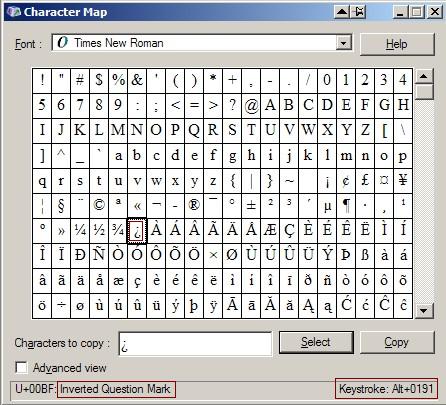
The symbols listed below are easy for occasional use whether for letter writing and invitations, business and academic documents, etc. The symbols are made by pressing and holding one of the ALT keys, then typing the indicated numbers. You must use the numeric keypad on the right side of your keyboard (check that Num Lock is on) or the "hidden" keypad on a laptop computer. For example: ALT + 0200 = È. The letter appears after the Alt key is released. The ALT key methods are shown in the charts below. The International English Keyboard is an easier way for those who use many European accent marks fairly often. The four digit combinations can also be found on the Character Map (use the search box near the lower left). Clicking on a letter or symbol usually shows the Alt keystrokes in the lower right of the Character Map window and its name in the lower left (see example). The Windows operating system seems to accept either the three or four digit system. If you prefer, you may be able to hi-lite, copy, and paste the accented letter (not the code) from below into your work. The charts are designed to be printed and displayed near a personal, office, or school computer. Browsers usually let you print a selected part of the page. Polish
for the ogonek, acute, stroke, and dot. See also Cyrillic.
|
|
Alt key + Four digits
¤
Alt+0164
à Alt+0224 | æ Alt+0230 Æ Alt+0198 ç Alt+0231 Ç Alt+0199 ê Alt+0234 é Alt+0233 ë Alt+0235 è Alt+0232 Ê Alt+0202 Ë Alt+0203 É Alt+0201 È Alt+0200 ï Alt+0239 í Alt+0237 î Alt+0238 ì Alt+0236 Í Alt+0205 Ì Alt+0204 Î Alt+0206 Ï Alt+0207 ñ Alt+0241 Ñ Alt+0209 œ Alt+0156 Œ Alt+0140 |
ô Alt+0244 ö Alt+0246 ò Alt+0242 õ Alt+0245 ó Alt+0243 ø Alt+0248 Ó Alt+0211 Ô Alt+0212 Õ Alt+0213 Ø Alt+0216 Ö Alt+0214 Ò Alt+0210 š Alt+0154 Š Alt+0138 ú Alt+0250 ü Alt+0252 û Alt+0251 ù Alt+0249 Ù Alt+0217 Ú Alt+0218 Ü Alt+0220 Û Alt+0219 ÿ Alt+0255 Ÿ Alt+0159 ý Alt+0253 Ý Alt+0221 ž Alt+0158 Ž Alt+0142 |
ª Alt+0170 Þ Alt+0222 þ Alt+0254 ƒ Alt+0131 ß Alt+0223 µ Alt+0181 ð Alt+0240 Ð Alt+0208 ° Alt+0176 º Alt+0186 • Alt+0149 „ “ Alt+0132/0147 (German quotes) … Alt+0133 ¬ Alt+0172 ¿ Alt+0191 ¡ Alt+0161 ¥ Alt+0165 £ Alt+0163 € Alt+0128 ¢ Alt+0162 ¹ Alt+0185 ² Alt+0178 ³ Alt+0179 ½ Alt+0189 ¼ Alt+0188 ¾ Alt+0190 |
|
128 Ç 129 ü 130 é 131 â 132 ä 133 à 134 å 135 ç 136 ê 137 ë 138 è 139 ï 140 î |
141 ì 142 Ä 143 Å 144 É 145 æ 146 Æ 147 ô 148 ö 149 ò 150 û |
151 ù 152 ÿ 153 Ö 154 Ü 160 á 161 í 162 ó 163 ú 164 ñ 165 Ñ 167 º 168 ¿ 248 ° 250 · (smaller bullet) |
Esperanto Symbols: 264 Ĉ 265 ĉ 284 Ĝ 285 ĝ 292 Ĥ 293 ĥ 308 Ĵ 309 ĵ 348 Ŝ 349 ŝ 364 Ŭ 365 ŭ |
Symbols and Greek letters used in math are between 224 and 247. FRENCH 133 à (0224) SPANISH 160 á (0225) French Continued 226 Ô (0212) ITALIAN 133 à (0224) PORTUGUESE Polish 132 ä (0228)
Copyright 1999-2020, starr.net.
Ongoing updates. Updated: 7-2020.
The long list at html code numbers
can be used as a guide to the alt key method for many less common symbols. See Tip 1 on that page.
Charts For
specific languages
(Alt key + 3 digits is
to left of accented letters; Alt key + 4 digits is to the right)
131 â (0226)
135 ç (0231)
130 é (0233)
138 è (0232)
136 ê (0234)
137 ë (0235)
140 î (0238)
139 ï (0239)
œ (0156)
147 ô (0244)
151 ù (0249)
150 û (0251)
183 À (0192)
182 Â (0194)
128 Ç (0199)
212 È (0200)
144 É (0201)
210 Ê (0202)
211 Ë (0203)
215 Î (0206)
216 Ï (0207)
Π(0140)
130 é (0233)
161 í (0237)
164 ñ (0241)
162 ó (0243)
163 ú (0250)
129 ü (0252)
Á (0193)
144 É (0201)
Í (0205)
165 Ñ (0209)
Ó (0211)
Ú (0218)
154 Ü (0220)
168 ¿ (0191)
173 ¡ (0161)
235 Ù (0217)
234 Û (0219)
174 « (0171)
175 » (0187)
138 è (0232)
141 ì (0236)
149 ò (0242)
151 ù (0249)
183 À (0192)
212 È (0200)
Ì (0204)
Ò (0210)
Ù (0217)
ã (0227)
à (0195)
135 ç (0231)
128 Ç (0199)
149 ò (0242)
Ò (0210)
162 ó (0243)
Ó (0211)
õ (0245)
Õ (0213)
GERMAN/SCANDINAVIAN
134 å (0229)
145 æ (0230)
ð (0240)
137 ë (0235)
148 ö (0246)
155 ø (0248)
225 ß (0223)
þ (0254)
129 ü (0252)
152 ÿ (0255)
142 Ä (0196)
143 Å (0197)
146 Æ (0198)
Ð (0208)
Ë (0203)
153 Ö (0214)
157 Ø (0216)
Þ (0222)
154 Ü (0220)
“ (0147)
„ (0132)
(German quotes)
TOP
French and Dutch translations:
(Since I am unfamiliar with these languages,
I am unable to determine the tranlation accuracy
or keep the sites up-dated. I appreciate suggestions and thank the translators.):
Dutch click here
French translation by Charles: www.web-media.fr/creation-de-site/ or
click here
About KeyBoard Help.
Attention webmasters! Please LINK to this page. Please do NOT copy this page,
and site, in printed or web page format without written permission from KBH.